
Key Takeaways
Key Takeaways
- The Logitech Zone 305 is a versatile business headset that can also handle media.
- The pros are: affordability, all-day comfort, high-quality audio, multi-device pairing, and a long battery life.
- The cons are: limited ambient noise isolation, plastic construction, and no active noise cancellation (ANC).
- We highly recommend the Logitech Zone 305 to professionals seeking a cost-effective headset that can transition between professional and casual use.
From the office cubicle to the living room couch, remote communication and personal media consumption have become ingrained in our lives. The right wireless headset enhances both experiences, allowing for seamless transitions among fielding business calls, enjoying lunchbreak podcasts, and unwinding with some evening gaming.
Throughout our testing of the Logitech Zone 305, we were impressed by the headset’s versatility, performance, and overall value. Although it’s designed for professional applications, you might be surprised how often you reach for it during your leisure time.
Is the Zone 305 the right choice for you? Let’s take an in-depth look at the headset’s specs and features, pros and cons, and use cases and users.
Why You Should Own a Wireless Headset

The days of being tethered to the desk are over! Wireless headsets allow for freedom of movement, which is an absolute must in today’s fast-paced world. Gone are the days of putting important clients on hold while you retrieve an important document.
Wireless headsets are also essential for multitasking. As we conducted this Logitech Zone 305 review, we really appreciated how we were able to go from chatting on a video call to listening to a Spotify playlist without missing a beat.
As the line between casual and professional interactions becomes increasingly blurred, communication tools evolve accordingly. Today’s modern professionals often work from home or in dynamic offices that don’t follow rigid workflow and scheduling structures. A wireless headset allows for agility and flexibility whether you’re on or off the clock.
The Logitech Zone 305 is a perfect example of a professional tool that won’t collect dust on the weekends.
Key Specs and Features
Let’s kick off this Logitech Zone 305 review by highlighting the headset’s main attributes.
1. Long-Range Bluetooth Connectivity:
With a wireless connection range of up to 30 meters (about 98 feet) in open-field line-of-sight conditions, this headset should cover the needs of the vast majority of users. Actual range can vary depending on the environment and computer setup. We were impressed by the reliable connection as we moved between rooms.
2. Seamless Device Switching:
The Zone 305 supports two active device connections and can store up to eight paired devices, allowing you to move between devices on the fly. This is useful if you regularly switch between a work computer and a phone without wanting to re-pair the headset each time.
3. On-Ear Design:
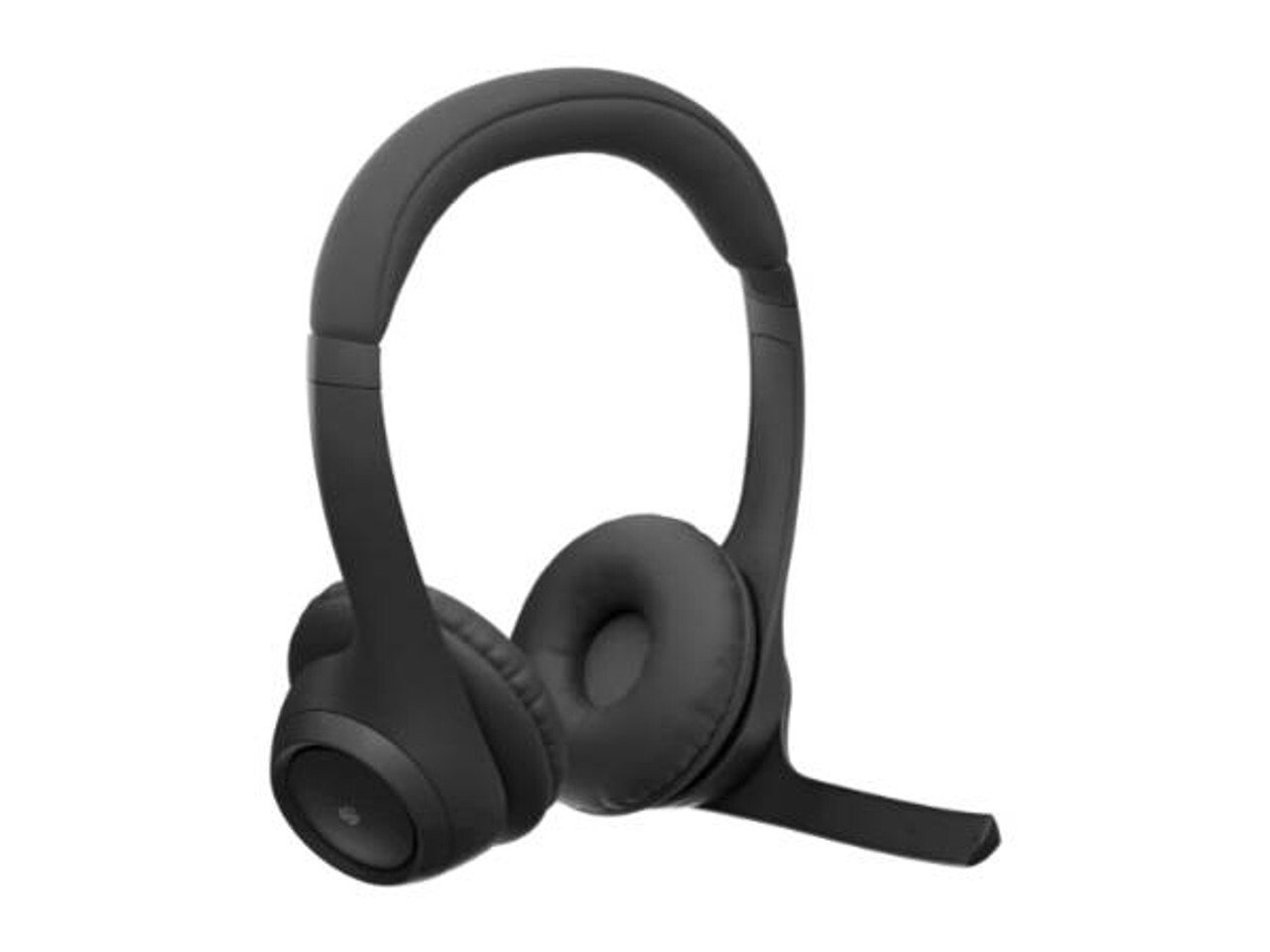
The headset’s comfort immediately stood out as soon as we started this Logitech Zone 305 review. Logitech classifies the Zone 305 as an on-ear headset, with a padded headband and soft earpads. At just 122 grams, it’s lightweight enough for extended workdays, as well as long listening sessions at home.
4. 30 mm Audio Drivers:
Sound is obviously a top priority when choosing a headset, and the Zone 305 doesn’t disappoint. Its 30 mm dynamic drivers are designed for calls and everyday media, with a 50 Hz to 20 kHz frequency response in music mode.
Although the Zone 305 doesn’t deliver the booming bass of dedicated gaming headsets or the pristine fidelity of studio headphones, the sound quality works well for everyday calls and casual listening.
5. Noise-Canceling Mic:
We used the headset in various environments throughout this Logitech Zone 305 review. In a busy location, the noise-canceling microphone worked great at removing distracting background sounds.
It’s worth noting that the on-ear design provides passive noise isolation, but the speakers don’t have active noise cancellation (ANC), so some bleed-through is to be expected in especially loud environments.
6. Excellent Battery Life:A single charge gives you up to 16 hours of talk time and up to 20 hours of listening time. And if you forgot to charge and need some quick juice, just five minutes of fast charging will give you up to one hour of talk time.
7. User-Friendly Controls:
Logitech did a fantastic job making this headset intuitive to use, even for non-technical users. During this Logitech Zone 305 review, we found that the controls for adjusting volume, muting, and managing calls were easy to adjust as needed. No complaints!
8. USB Receiver Options:
Receiver versions of the Zone 305 include a USB-C receiver and USB-A adapter, giving you another wireless connection option in addition to Bluetooth. The native Bluetooth version skips the receiver altogether, which can free up a USB port.
Pros and Cons
Pros:
- Affordability: You get what you pay for and a whole lot more. The Zone 305 is an excellent choice for individuals on a budget or businesses seeking a go-to headset for mass deployment.
- All-Day Comfort: As soon as we started this Logitech Zone 305 review, we appreciated its comfort. With soft earpads and a lightweight design, this headset is ideal for extended use.
- High-Quality Audio: The 30 mm drivers deliver clear audio, while the dual noise-canceling microphones help reduce background noise on calls.
- Multi-Device Pairing: The Zone 305 supports two active connections, making it easier to move between paired devices without re-pairing.
- Long Battery Life: With 16 hours of talk time and 20 hours of listening time on a single charge, the Zone 305 keeps you connected all day.
Cons:
- Limited Ambient Noise Isolation: When conducting this Logitech Zone 305 review in an especially loud environment, there was some mild noise bleed-through. The Zone 305 relies on passive isolation rather than active noise cancellation.
- Plastic Construction: The lightweight plastic build doesn’t have the premium feel of some higher-end headsets.
- No Active Noise Cancellation: The Zone 305 is a solid everyday headset, but it doesn’t include active noise cancellation. That feature is more common on higher-end models.
Is the Logitech Zone 305 Right for You?

We went into this Logitech Zone 305 review knowing that it’s a business headset first and foremost. While it can certainly handle music and gaming, there are better options for audiophiles and gamers.
Here’s who the Logitech Zone 305 is for:
- Remote and Hybrid Professionals: Whether you’re stationed at home or in a cubicle, this headset is perfect for fielding calls, participating in meetings, and collaborating with colleagues.
- Casual Listeners: This headset is a great choice for those who want to own one headset that can transition between professional applications and personal entertainment.
- Budget-Minded Shoppers: The Zone 305 has a phenomenal bang-to-buck ratio. If we didn’t know the price before this Logitech Zone 305 review, we would have guessed that it costs significantly more.
- Users of Multiple Devices: If you regularly switch between a laptop, desktop, tablet, and smartphone, a headset with multi-device pairing will be a huge upgrade.
Quick Tips: Business Use vs. Casual Use
Think about the headset’s intended use when deciding if it’s right for you:
- Business Use: This headset focuses heavily on the needs of professionals. Its wireless range of up to 30 meters (about 98 feet), noise-canceling mic, and comfortable build make it ideal for long workdays.
- Casual Use: If you need a headset solely for gaming, listening to music, or watching movies, we recommend getting a headset purpose-designed for media. This headset will work, but there are better options if you don’t need a headset for communicating.
Find Your Perfect Solution
Ultimately, this Logitech Zone 305 review revealed that business headsets don’t have to be one-dimensional. The Zone 305 is a fantastic option for professionals who want a versatile wireless headset that can do it all. Place your order with confidence at Chester Springs AV.
We highly recommend the Zone 305, but we understand that everyone has unique needs, preferences, and budgets. Feel free to get in touch for a free consultation. One of our friendly experts can help you choose the right headset. Level up your communications today!